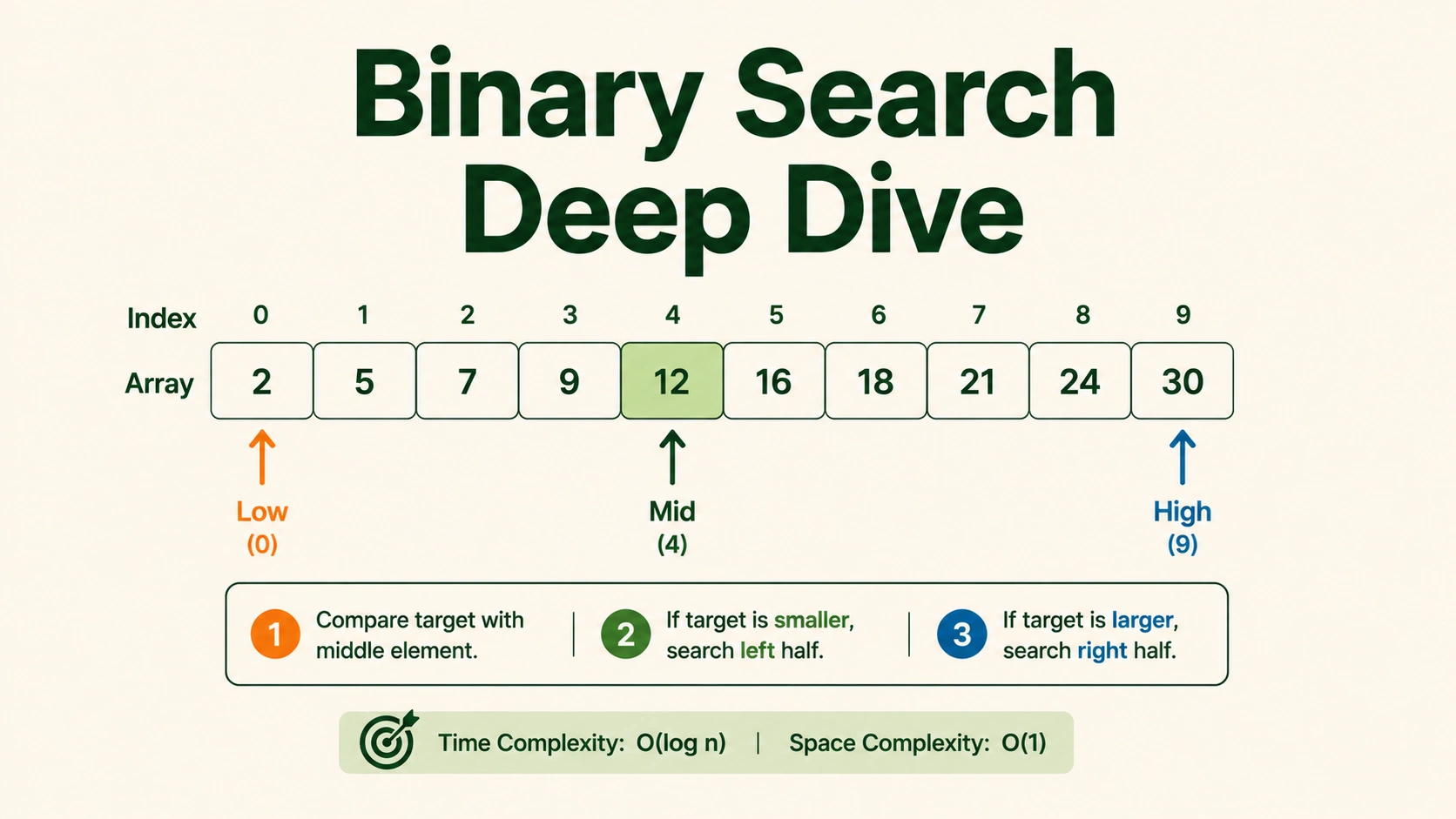
Introduction: The Magical Hallway of 100 Doors
Imagine you are playing a game with a friendly wizard. The wizard has a long hallway with 100 secret locked doors, numbered 1 to 100 in a perfect line. Behind exactly one door is a giant chest of chocolate gold coins!
How would you find the chocolate gold?
- The Foot-Tired Walk (Linear Search): You walk up to Door #1, open it, and look inside. Not there? You walk to Door #2, check it, then Door #3... If the chocolate coins are behind Door #100, you will have checked all 100 doors! This is super slow and makes your feet tired. In computer science, this is called a Linear Search, or
O(n)complexity. - The Wizard's Halving Spell (Binary Search): Instead of starting at the beginning, you walk straight to the exact middle: Door #50. You tap the door, and the wizard plays a magical tune and whispers: "The chocolate gold is behind a door with a LOWER number!"
Look at what just happened! In just one single guess, you have magically eliminated half of all the doors! You know with 100% certainty that the gold is not behind Door 50, and it's definitely not behind any door larger than 50. In a flash, 50 doors disappear! Your search space instantly shrinks to just 49 doors (1 to 49).
Next, you guess the middle of your remaining doors: Door #25. The wizard's magic voice says: "HIGHER!"
Boom! Half of the remaining options are gone again! Now you know the door must be between 26 and 49.
- You guess the middle: Door #37. "LOWER!" (doors left: 26 to 36).
- You guess the middle: Door #31. "HIGHER!" (doors left: 32 to 36).
- You guess the middle: Door #34. "LOWER!" (doors left: 32 to 33).
- You guess Door #33. "Correct! You win the chocolate gold!"
By constantly dividing the doors in half, you found the correct door in just 6 guesses instead of up to 100!
Another real-world example is looking for the word "Smith" in a thick, sorted physical dictionary. You don't read from page 1. You open it in the exact middle. If you see words starting with "M", you know "Smith" must be in the right half of the book, so you throw the entire left half away. You repeat this middle-opening until you land on the page!
In computer science, this is called Binary Search. It is a classic Divide-and-Conquer algorithm. It reduces the time complexity of finding an element in a sorted collection from linear time O(n) to logarithmic time O(log n).
The Magic of Logarithms: Why O(log n) is Insanely Fast
To see how cool Binary Search is, look at how the number of steps grows as our collection size increases.
With Linear Search, if the collection doubles in size, the worst-case number of steps also doubles. With Binary Search, doubling the size of the collection adds exactly one extra step! This is because each step divides the remaining doors by 2.
Mathematically, the number of steps required is represented by log_2(n), which is the power you raise 2 to in order to get n.
Hallway Size (N doors) | Linear Search Max Steps (O(n)) | Binary Search Max Steps (O(log n)) | Real-World Scale Comparison |
|---|---|---|---|
| 10 | 10 | 4 | A small classroom roster |
| 100 | 100 | 7 | A school grade list |
| 1,000 | 1,000 | 10 | Pages in a very thick novel |
| 1,000,000 | 1,000,000 | 20 | Population of a major city |
| 1,000,000,000 | 1,000,000,000 | 30 | Population of a continent |
| 4,000,000,000 | 4,000,000,000 | 32 | Almost the entire global internet population |
Think about this: If you had a sorted database containing every single person on Earth (roughly 8 billion people), a linear search could require looking at all 8 billion records. Binary Search will locate any specific person in at most 33 steps! That is the power of logarithmic growth!
Core Template 1: Standard Binary Search (Find Exact Value)
To perform binary search on an array, the array must be sorted. If the array is not sorted, we cannot guarantee that discarding a half is safe.
We maintain two boundary variables:
left: The index of the start of our current search range (initially 0).right: The index of the end of our current search range (initiallylen(array) - 1).
These boundaries behave like converging pointers moving towards each other based on comparison results.
Visualize how two pointers starting at opposite ends of a sorted array converge inward to find a pair that meets a target condition in O(n) time.Two Pointers Technique
The Midpoint Overflow Warning
In many programming languages (such as C++, Java, and Go), integers have a maximum size limit. If you calculate the midpoint using the formula:
mid = (left + right) / 2
and both left and right are very large values (close to 2^31 - 1, which is about 2.14 billion), adding them together can exceed the maximum possible integer size. This causes an integer overflow, resulting in negative numbers and program crashes.
To write production-grade, bug-free code, always calculate the midpoint like this:
mid = left + (right - left) / 2
This expression is mathematically identical to (left + right) / 2, but it calculates the distance between the two boundaries first, halves it, and adds it to the left boundary. This completely avoids the danger of overflow because it never calculates a sum larger than right.
Watch the search space bisect at each step as low, high, and mid pointers narrow down the target value in a sorted array.Binary Search
Standard Implementation in 4 Languages
Here is the clean implementation of standard binary search that searches for a target value inside a sorted list of numbers, returning its index if found, or -1 if not.
Trace Table for Standard Binary Search
Let's trace the execution of the algorithm with:
- Input Array:
nums = [1, 3, 5, 7, 9, 11, 13, 15] - Target:
7
| Iteration | Left Index | Right Index | Calculated Mid Index | Mid Element (nums[mid]) | Comparison Action | New Boundaries |
|---|---|---|---|---|---|---|
| Start | 0 | 7 | - | - | Initial Setup | left = 0, right = 7 |
| Loop 1 | 0 | 7 | 3 | 7 | 7 == 7 (Target Found!) | Return index 3 |
Now let's trace with:
- Input Array:
nums = [1, 3, 5, 7, 9, 11, 13, 15] - Target:
4
| Iteration | Left Index | Right Index | Calculated Mid Index | Mid Element (nums[mid]) | Comparison Action | New Boundaries |
|---|---|---|---|---|---|---|
| Start | 0 | 7 | - | - | Initial Setup | left = 0, right = 7 |
| Loop 1 | 0 | 7 | 3 | 7 | 7 > 4 → search left | left = 0, right = 2 |
| Loop 2 | 0 | 2 | 1 | 3 | 3 < 4 → search right | left = 2, right = 2 |
| Loop 3 | 2 | 2 | 2 | 5 | 5 > 4 → search left | left = 2, right = 1 |
| End | 2 | 1 | - | - | Loop breaks since left > right | Return -1 |
Core Template 2: Binary Search for Leftmost Boundary (Find First Occurrence)
Sometimes, the sorted array contains duplicate elements (e.g. [1, 2, 2, 2, 3, 4]), and you need to find the first (leftmost) index of the target element.
If we use the standard template, we might land on any of the duplicates and stop immediately, which is incorrect.
To find the leftmost boundary:
- When we find that
nums[mid] == target, we do not stop. Instead, we know this is a potential candidate, but there might be a smaller index to the left that also holds the target. - Therefore, we record the index, and continue searching in the left half:
right = mid - 1. - We loop as long as
left <= right.
Leftmost Binary Search
Core Template 3: Binary Search for Rightmost Boundary (Find Last Occurrence)
Similarly, if we want to find the last (rightmost) index of a target element in an array with duplicate elements:
- When
nums[mid] == target, we record the index, but we continue searching the right half:left = mid + 1. - This allows us to see if there is another instance of the target at a larger index.
Rightmost Binary Search
Core Pattern 4: Binary Search on Solution Space
This is the most advanced and high-impact category of binary search questions. You will often encounter problems where there is no physical array to search. Instead, you are asked to find the minimum or maximum integer value X that satisfies a specific condition.
The Key Requirement: Monotonicity
To use Binary Search on a solution space, the system must be monotonic. This means:
- If a value
Xworks, then all values larger thanXwill also work (in a minimum-seeking problem). - If a value
Xworks, then all values smaller thanXwill also work (in a maximum-seeking problem).
Real-World Analogy: Coco the Monkey Eating Bananas
Imagine a monkey named Coco. There are piles of bananas, and Coco wants to eat all of them within H hours. Coco can choose her eating speed K (bananas per hour).
- If Coco eats extremely fast (
K = 1000bananas/hour), she will easily finish in time, but it might be overkill. - If Coco eats extremely slowly (
K = 1banana/hour), she won't finish in time. - We want to find the minimum speed
Ksuch that Coco can finish all bananas in<= Hhours.
Notice the monotonicity:
- If speed
Kworks, any speed faster thanKwill also work. - If speed
Kdoes not work, any speed slower thanKwill definitely not work.
Instead of trying speeds one by one (K=1, K=2, ...), we use Binary Search on the range of possible speeds!
left= 1 (minimum possible speed)right= maximum number of bananas in a single pile (maximum speed she would ever need)
Template for Solution Space
Core Pattern 5: Search in a Rotated Sorted Array
In coding interviews, a common variation involves a sorted array that has been rotated at an unknown pivot index. For example, the sorted array [0, 1, 2, 4, 5, 6, 7] might be rotated to become [4, 5, 6, 7, 0, 1, 2]. We still need to search for a target value in O(log n) time.
The Golden Rule of Rotated Arrays
When you divide a rotated sorted array in half, at least one of the halves is guaranteed to be normally sorted.
We can check which half is sorted by comparing the boundary values:
- If
nums[left] <= nums[mid], it means the left half (from indexlefttomid) is normally sorted. - Otherwise, the right half (from index
midtoright) must be normally sorted.
Once we identify the sorted half, we check if our target falls within its range.
- If it does: we search in that half.
- If it does not: we search in the other half.
Rotated Sorted Array Implementation
Trace Table for Rotated Search
Let's trace search_rotated with:
- Input Array:
nums = [4, 5, 6, 7, 0, 1, 2] - Target:
0
| Iteration | Left Index | Right Index | Calculated Mid | Mid Element | Left Sorted? | Target in Range? | Action taken | New Boundaries |
|---|---|---|---|---|---|---|---|---|
| Start | 0 | 6 | - | - | - | - | Initial Setup | left=0, right=6 |
| Loop 1 | 0 | 6 | 3 | 7 | Yes (4 <= 7) | No (0 not in [4, 7)) | Search right half | left=4, right=6 |
| Loop 2 | 4 | 6 | 5 | 1 | No (0 <= 1 false) | Yes (0 in (1, 2] no) | Search left half | left=4, right=4 |
| Loop 3 | 4 | 4 | 4 | 0 | Yes (0 <= 0) | Yes (Found!) | Return index 4 | - |
Common Interview Pitfalls and Debugging Strategies
Even experienced programmers make mistakes when writing binary search. Here are the three most common bugs and how to avoid them:
1. The Infinite Loop (Incorrect Boundary Updates)
- The Bug: The code runs forever and times out.
- Why it happens: You wrote
left = midorright = midinstead ofleft = mid + 1orright = mid - 1. If the search range shrinks to two elements and the left boundary does not move, the midpoint calculation will keep returning the same index, preventing the loop from terminating. - The Fix: In the standard template, always exclude the checked midpoint: use
left = mid + 1andright = mid - 1.
2. Off-by-One Boundary Check
- The Bug: The code fails to find targets located at the very start or end of the array.
- Why it happens: You wrote
while left < right:instead ofwhile left <= right:. When the search space shrinks to a single element whereleft == right, the loop terminates without checking that final element. - The Fix: Make sure your loop condition is
left <= rightif you are checking a range where both boundaries are inclusive.
3. Running Binary Search on Unsorted Data
- The Bug: The algorithm returns
-1even though the element exists in the array. - Why it happens: You forgot to sort the array before calling binary search, or the array was modified and became unsorted.
- The Fix: Double-check that the input data is guaranteed to be sorted. If not, you must sort it first (
O(n log n)) or stick to Linear Search (O(n)).
Interactive Practice Problems
Verify your Binary Search mastery on our platform:
- Binary Search — Practice the standard loop and boundary templates.
- Search a 2D Matrix — Treat a 2D matrix as a flat sorted array using division/modulus row-column mapping.
- Find Minimum in Rotated Sorted Array — Search for the inflection split point of rotation.
Interactive Visualizations
Engage with these concepts dynamically. Click on any card below to launch the interactive simulator and step through the algorithm execution.
Binary Search
Watch the search space bisect at each step as low, high, and mid pointers narrow down the target value in a sorted array.