Introduction: The Upside-Down Magic Tree
If you click around your computer's files, you are interacting with a Tree data structure. At the absolute top, there is a root folder (like C: on Windows or / on Mac/Linux). Inside it, you have subfolders like Users, Program Files, and System. Inside Users, you might have folders like Documents and Downloads, and eventually, you reach actual files (like photo.jpg or resume.pdf) which cannot contain anything else.
In computer science, a tree is represented upside down. The "Root" is at the very top, and the branches grow downwards, splitting into smaller branches until they reach the "Leaves" at the bottom.
Analogy: Nests in an Upside-Down Tree
Have you ever climbed a tree in a park? Computer trees are extra magical because they grow upside-down! The Root of the tree is in the clouds at the very top, and the branches grow downwards.
- Nodes: Think of nodes as little bird nests built on the branches. Each nest stores a toy (our Data).
- Edges: The wooden branches connecting the nests are Edges.
- Parent and Child: If nest A is directly above nest B, A is the Parent and B is the Child.
- Leaves: A nest at the very bottom that has no branches growing under it is a Leaf!
Tree Terminology
Before writing tree code, you must master the vocabulary:
- Node: A data container (like a folder or file).
- Root: The top-most node in the tree. It has no parent.
- Edge: The link or pointer connecting one node to another.
- Child: A node directly connected to another node when moving away from the root.
- Parent: The node directly above a child node, closer to the root.
- Leaf: A node that has no children (the endpoints of the branches).
- Height: The number of edges on the longest path from a node to a leaf (the height of a leaf is 0, and the root's height represents the height of the entire tree).
- Depth: The number of edges from the root to a specific node (the root's depth is 0).
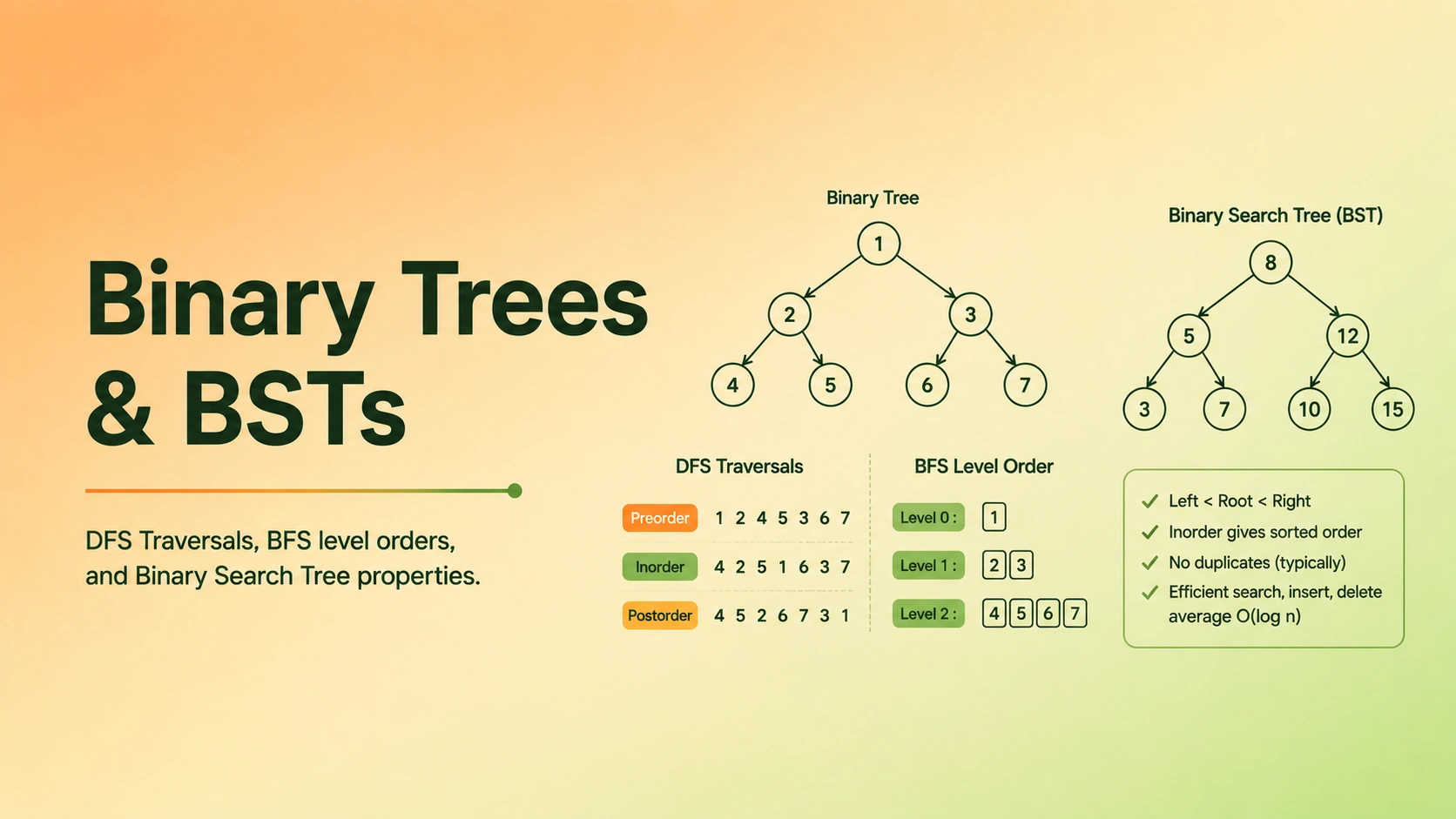
Binary Trees vs. Binary Search Trees (BST)
The two most common tree structures you will see in technical interviews are Binary Trees and Binary Search Trees (BST).
1. Binary Trees
Analogy: Nests with Two Branches
A tree is a Binary Tree if each bird nest has at most two branches growing under it (a Left nest and a Right nest). There are no rules about what toys go where—you can throw them in any nest you want!
Here is the standard structural definition of a Binary Tree Node:
2. Binary Search Trees (BST)
Analogy: The Number Sorting Game
A Binary Search Tree (BST) is super neat because it has a strict rule for how toys are sorted:
- Every toy in the left subtree must be strictly smaller than the parent's toy.
- Every toy in the right subtree must be strictly larger than the parent's toy.
Imagine you are looking for the number 3 in this tree:
- You start at the top root nest which has a 5.
- Is 3 smaller or larger than 5? Smaller! So you know it must be on the left side. You can ignore the entire right side of the tree!
- You slide down to the left nest which has a 3. You found it in just two steps! This rule makes searching super fast because you throw away half the tree with every single step!
A Binary Search Tree is a binary tree that maintains a strict sorting property (the BST Invariant):
- The value of every node in the left subtree must be strictly less than the parent node's value.
- The value of every node in the right subtree must be strictly greater than the parent node's value.
This invariant makes search highly efficient. If you want to check if a value exists in a BST, you do not have to scan the entire tree. You look at the current node:
- If the target is smaller, you recursively go left.
- If the target is larger, you recursively go right.
In a balanced BST, this halves the search space at each level, reducing lookup time from O(n) to O(log n), matching the performance of Binary Search on arrays!
BST Operations & Time Complexity
Here is the operational complexity profile for Binary Search Trees:
| Operation | Average Case (Balanced Tree) | Worst Case (Skewed Tree) | Why / Notes |
|---|---|---|---|
| Search | O(log n) | O(n) | Halves the search space at each step in balanced trees; searches linearly in unbalanced trees. |
| Insertion | O(log n) | O(n) | Traverses tree height to find the correct insertion location. |
| Deletion | O(log n) | O(n) | Requires searching for node, then rearranging pointers. |
The Skewed Tree Hazard
If you insert sorted elements into a BST (e.g., 1, 2, 3, 4, 5), the tree becomes a single long branch (a linear list):
[1] -> [2] -> [3] -> [4] -> [5]
All operations degrade to O(n)! This is why production systems use self-balancing trees like AVL or Red-Black Trees, which automatically rearrange nodes during insertion to keep the height logarithmic.
Tree Traversals: DFS vs. BFS
Because tree structures are non-linear, we have multiple paths to traverse them. We group traversals into two main strategies: Depth-First Search (DFS) and Breadth-First Search (BFS).
1. Depth-First Search (DFS)
Walk through the standard Depth-First Search inorder traversal (Left, Root, Right) of a binary tree.DFS Inorder Traversal
Analogy: Exploring a Deep Cave
Imagine you are exploring a deep cave with multiple branches. In Depth-First Search, you pick one branch and walk as deep as possible until you hit a wall at the bottom. Only then do you walk back (backtrack) and try the next branch!
How we do it: We usually use Recursion (a function magically calling itself) to remember where we left off.
Depending on when we write down the name of the nest we are in, we have three orders:
- Preorder (Write name -> Left branch -> Right branch) — Great for copying a tree!
- Inorder (Left branch -> Write name -> Right branch) — This reads a BST in perfect sorted order, from smallest to biggest!
- Postorder (Left branch -> Right branch -> Write name) — Perfect for deleting a tree because you clean the children nests before the parent!
2. Breadth-First Search (BFS) / Level Order Traversal
See how a queue organizes nodes to traverse a binary tree level-by-level from top to bottom, left to right.BFS Level Order Traversal
Analogy: Ripples in a Puddle
Imagine you drop a pebble in a puddle of water, and it creates ripples that spread outwards in circles. In Breadth-First Search, you visit nests level-by-level, starting at the top root nest, then checking all nests on the first level down, then all nests on the second level down, and so on. You spread out wide before going deep!
How we do it: We use a Queue (a line of people, First-In-First-Out).
- We put the root nest in the line.
- Then, we take it out, write its name, and put its children at the back of the line.
- We keep doing this until the line is empty!
Walkthrough of BFS Level Order Traversal
Let's trace a level order traversal of this binary tree:
- Start: Push
[3]into queue. Queue:[[3]]. - Level 0: Size = 1.
- Pop
[3]. Children[9]and[20]are pushed. - Level list:
[3]. Queue:[[9], [20]].
- Pop
- Level 1: Size = 2.
- Pop
[9]. No children. Queue:[[20]]. - Pop
[20]. Children[15]and[7]are pushed. Queue:[[15], [7]]. - Level list:
[9, 20].
- Pop
- Level 2: Size = 2.
- Pop
[15]. No children. Queue:[[7]]. - Pop
[7]. No children. Queue:[]. - Level list:
[15, 7].
- Pop
- End: Queue is empty. Result is
[[3], [9, 20], [15, 7]].
Implementations in 4 Languages
Let's look at the standard implementations of Inorder DFS and Level Order BFS in Python, Java, C++, and TypeScript.
Core Problem Walkthroughs
1. Invert a Binary Tree
Inverting a binary tree (creating its mirror image) is the classic interview question.
Watch how every node in a binary tree has its left and right children swapped recursively to create a mirror image.Invert Binary Tree
- Intuition: Swap the left and right children of every node in the tree recursively.
Invert Tree Implementation
Trace Table: Inverting Tree [4, 2, 7]
We start at root node [4].
| Recursion Step | Node Visited | Old Left Pointer | Old Right Pointer | Swapped Action |
|---|---|---|---|---|
| 1 | [4] (Root) | [2] | [7] | Swapped! Left is now [7], Right is now [2] |
| 2 | [7] | null | null | Swapped nulls (no change). Return [7] |
| 3 | [2] | null | null | Swapped nulls (no change). Return [2] |
We return root [4] which now points to 7 on the left and 2 on the right.
2. Lowest Common Ancestor (LCA) in a BST
Visualize how the binary search tree property is leveraged to find the lowest common ancestor node of two target nodes in O(log n) time.Lowest Common Ancestor in BST
The Lowest Common Ancestor of two nodes P and Q is the lowest node in the tree that has both P and Q as descendants.
Because it is a BST, we can use the sorting property to find the LCA in a single pass without traversing the whole tree:
- If both
PandQhave values strictly smaller than the current node's value, their ancestor must lie in the left subtree. Move left. - If both
PandQhave values strictly larger than the current node's value, their ancestor must lie in the right subtree. Move right. - If one node is smaller and the other is larger (or one of them is the current node), then the current node is the LCA split point!
LCA BST Implementation
Common Interview Pitfalls and Debugging Strategies
-
Recursion Stack Overflow:
- Symptom:
RangeError: Maximum call stack size exceededorRecursionError. - Cause: Your base case is missing or incorrect, causing the recursive function to call itself infinitely.
- Fix: Ensure that your recursive calls check if the node is
nullfirst and exit:if not node: return.
- Symptom:
-
BST Invariant Violation:
- Symptom: Search fails because nodes are inserted incorrectly.
- Cause: You only compared a node with its immediate children rather than checking that all nodes in the left subtree are smaller than the parent.
- Fix: When validating BSTs, pass
minandmaxboundaries down the recursion stack to restrict child nodes correctly.
Practice Problems & Interactive Visualizers
Build your confidence by practicing with these real problems on our platform:
- Invert Binary Tree — Recursive swaps of child pointers.
- Maximum Depth of Binary Tree — Compute height bottom-up.
- Lowest Common Ancestor of a BST — Trace BST split points.
Interactive Visualizations
Engage with these concepts dynamically. Click on any card below to launch the interactive simulator and step through the algorithm execution.
DFS Inorder Traversal
Walk through the standard Depth-First Search inorder traversal (Left, Root, Right) of a binary tree.
BFS Level Order Traversal
See how a queue organizes nodes to traverse a binary tree level-by-level from top to bottom, left to right.
Lowest Common Ancestor in BST
Visualize how the binary search tree property is leveraged to find the lowest common ancestor node of two target nodes in O(log n) time.
BST Insertion
See how a new value is placed in a Binary Search Tree by recursively comparing values and branching left or right.
Invert Binary Tree
Watch how every node in a binary tree has its left and right children swapped recursively to create a mirror image.